Qevlar AI

Phishing investigations typically take 20+ minutes of manual analysis across multiple security tools. This case study shows how Qevlar AI autonomously completes the entire investigation — from reported email to compromised account discovery —in just 3 minutes.

When a phishing alert lands in the queue, security analysts face a critical challenge: distinguishing genuine threats from false positives while racing against the clock.
And the volume is staggering. Based on our observations across leading enterprises and MSSPs, organizations can see upwards of 10,000 reported phishing emails per year, while managed security service providers (MSSPs) routinely handle 800+ flagged emails monthly per client.
For security teams, phishing alerts represent 15–20% of all manual investigative activity, with complex campaign investigations consuming up to an hour of analyst time.
Traditional security tools often stop at initial email analysis, leaving analysts to manually piece together what happened next. Did the user click the link? Was their account compromised? What data was accessed?
Answering these questions typically requires pivoting between multiple security tools, correlating timestamps across different log sources, and conducting manual queries that can take 20 minutes or more per alert.
In this article, we will use a real-time anonymized case where a user reported a suspicious email to show you how Qevlar performs the investigation process in under 3 mins.
All the names and companies mentioned are fictional.

The investigation begins with a seemingly straightforward alert: Lisa, an employee at AcmeCorp, has reported a phishing email. The email claims to be from Microsoft, uses urgent language about account verification, and contains a prominent call-to-action button. The sender address is securitynodereply@microsoft-t.com. It is close enough to legitimate Microsoft domains to fool a casual observer, but clearly a typosquatted domain designed to deceive.

At this stage, most security teams would verify the email as malicious, block the sender, and close the ticket. But that approach leaves critical questions unanswered: Did anyone else receive this email? Did anyone click the malicious link? If so, what happened next?
Qevlar AI takes a different approach, treating the reported email as the starting point for a comprehensive analysis that unfolds in three stages.
The first stage focuses on understanding exactly what the organization is dealing with. Qevlar begins by analyzing the email itself, examining both its content and the infrastructure behind it.
Using Qevlar Eye, the platform's vision and semantic analysis engine, Qevlar renders and analyzes the email both visually and textually. This dual approach catches deception techniques that single-method analysis might miss: fake Microsoft logos, fraudulent branding, interface elements designed to mimic legitimate communications, and subtle linguistic cues that indicate social engineering tactics.
The semantic analysis reveals several red flags. The email subject employs urgency tactics, a common phishing technique designed to bypass rational decision-making. The body contains a call-to-action button that directs users to a website outside Microsoft's legitimate domains. These elements, when combined, paint a clear picture of a social engineering attempt.

Beyond the email content, Qevlar investigates the underlying infrastructure. The platform queries cyber threat intelligence sources to gather information about the domains, URLs, and IP addresses embedded in the email.

The sending domain, microsoft-t.com, is immediately flagged as a typosquatted domain, intentionally designed to mimic Microsoft's legitimate domains. The embedded URL leads to a fake reCAPTCHA page, which multiple threat intelligence sources have identified as malicious. VirusTotal confirms its malicious nature, URLhaus flags it as potentially malicious, and Qevlar Eye's visual analysis reveals it's designed for credential theft.
Interestingly, the IP address associated with the infrastructure doesn't trigger immediate alarms in threat intelligence databases. This is typical of phishing campaigns that leverage compromised legitimate infrastructure or frequently rotate their hosting.
By the end of Stage 1, the verdict is clear: this is a sophisticated phishing email using typosquatted domains and fake authentication pages to steal credentials.
Confirming the email is malicious is just the beginning. Stage 2 shifts focus to understanding the campaign's reach within the organization and identifying who might be affected.
Qevlar queries the organization's email security logs to search for additional emails from the malicious sender address. The results reveal this isn't an isolated incident. 23 employees received emails from securitynodereply@microsoft-t.com, all sharing the same malicious properties.

But the investigation doesn't stop there. Qevlar broadens the search to the entire microsoft-t.com domain, uncovering even more emails sent from different addresses but using the same malicious infrastructure. This reveals a coordinated phishing campaign targeting the organization.
The critical question becomes: did anyone interact with these emails? Qevlar queries URL click event logs, searching for anyone who clicked the malicious link. The results identify Robert Smith, whose account robert.smith@acmecorp.org clicked the phishing URL.

This discovery fundamentally changes the investigation. What started as a reported phishing email has now revealed a potential account compromise. The investigation must now pivot from analyzing the phishing infrastructure to assessing the impact on Robert's account.
To confirm the click event and understand what happened next, Qevlar examines proxy logs around the same timestamp. The logs verify that traffic from Robert's workstation reached the malicious domain at 4:42 PM. More concerningly, the logs show a POST request, indicating that data was submitted to the fake page, likely Robert's credentials.

At this point, a new observable enters the investigation: Robert Smith's email address. This becomes the focal point for Stage 3.
With evidence that Robert submitted his credentials to a phishing site, Stage 3 investigates what the attacker did with that access. This is where Qevlar's investigation diverges most dramatically from traditional approaches, which typically end once a phishing email is confirmed.
Qevlar queries Office 365 logs for Robert's account, searching for anomalies following the credential submission. Two findings immediately stand out.
First, approximately 20 minutes after clicking the phishing link, a forwarding rule was created on Robert's account. The rule automatically forwards incoming emails to an external Gmail address. It’s a classic data exfiltration technique used by attackers to maintain persistent access to a victim's communications.
Second, authentication logs show a connection from an IP address that has never been associated with Robert's account before. This IP address becomes another discovered observable requiring investigation.
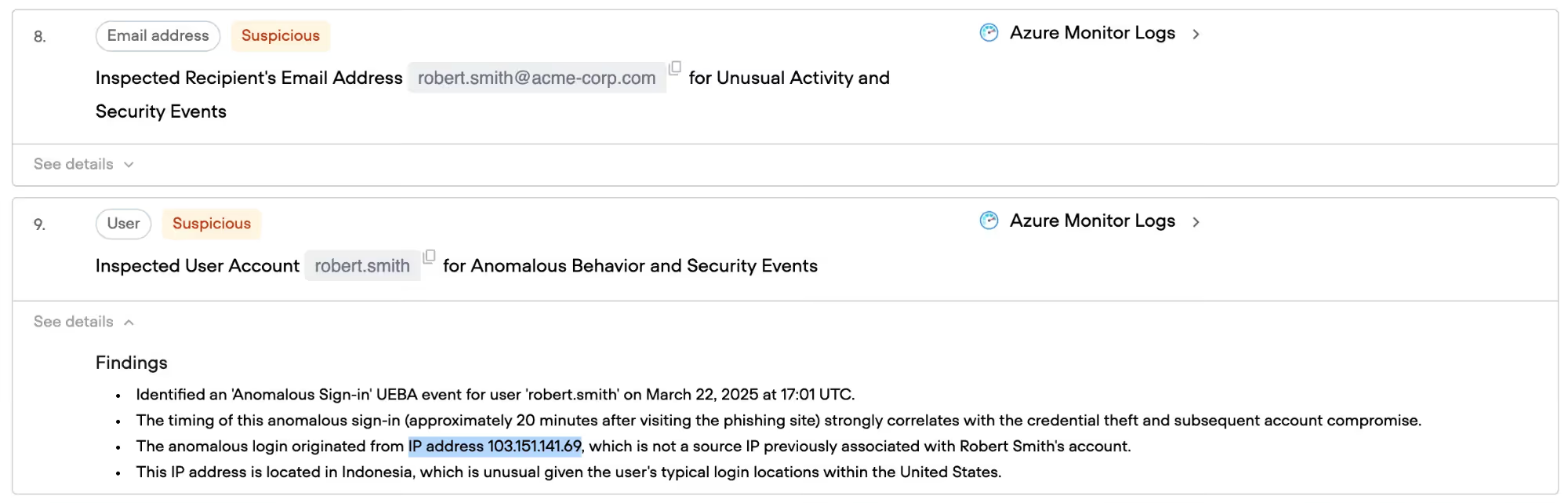
Following this new investigation path, Qevlar queries threat intelligence sources about the suspicious IP address. While most sources provide limited information, one high-confidence source identifies it as a VPN server hosted in Indonesia.
This finding is significant. Robert's normal access patterns don't include VPN usage from Indonesia, making this a clear indicator of unauthorized access. The attacker, having stolen Robert's credentials, is accessing his account from a different geographic location.
Qevlar then checks whether this IP address has been used to access other employee accounts, potentially indicating lateral movement. The query returns negative results—the IP only appears in connection with Robert's account, suggesting the attack remained contained to his credentials.

The final question is: what damage was done? Qevlar analyzes the forwarding rule to determine what emails were exfiltrated from Robert's account. The investigation reveals that 4 emails were forwarded to the attacker's Gmail address before the compromise was detected. These include both internal communications and external messages, representing a potential exposure of sensitive corporate information.

After the investigation is done, Qevlar provides clear guidance for remediation. Based on the investigation findings, the platform recommends specific actions:
Immediate containment: Reset Robert Smith's password, remove the malicious forwarding rule, and revoke active sessions from the suspicious IP address.
Organizational protection: Block the microsoft-g.com domain and the associated malicious URLs at the email gateway and web proxy to prevent further victims.
Further investigation: Review the seven exfiltrated emails to assess potential data exposure and determine if additional security measures are required.
User education: Brief Robert Smith on the compromise to improve awareness and prevent future incidents.
For organizations using Security Orchestration, Automation and Response (SOAR) platforms or ticketing systems, Qevlar's investigation results can be automatically ingested, allowing analysts to take remediation actions without switching between consoles.
Phishing remains one of the most popular use cases analysts deal with, but the alert volumes frequently distract them from performing the in-depth investigations leaving the potential threats unattained.
Let Qevlar do the heavy lifting so your analysts could do what they were hired for: solving complex security challenges, hunting for advanced threats, and protecting the organization from sophisticated adversaries.
Book a demo: https://www.qevlar.com/

Every reported email gets the full investigation, not a severity-gated one. The point of the case is that a single reported email looked routine until the investigation found 23 recipients, a confirmed click, credential submission, and an active account takeover. Applying the same depth consistently is what catches the compromise that a "confirm malicious, block, close" workflow would have missed.
They get investigated and closed as not harmful, the same way a real threat gets confirmed. Because the investigation runs end to end automatically, a benign report costs analyst time only if something actually surfaces, so the false alarms that make up much of phishing queue volume get cleared without manual pivoting across tools. That's where the time saving comes from, not from skipping the safe ones.
It looks past the login itself to the behavior around it. Here the logins were technically valid, but a forwarding rule to an external Gmail address appeared 20 minutes after the click, and authentication came from an Indonesian VPN IP never associated with the user. Valid credentials don't explain anomalous geography, but a new exfiltration rule, and timing that lines up with the phishing click together confirm takeover.
Yes. Qevlar's investigation results can be ingested automatically into SOAR platforms or ticketing systems, so analysts act on the findings without switching consoles. The output also includes a structured remediation plan, containment, organizational blocking, data-exposure review, and user follow-up, so the response can move straight into existing workflows rather than being rebuilt by hand.